BM Schools Academic Quiz · For teachers
A clear plan for
Challenge day.
You organise the sitting. Pupils bring their curiosity. The Organiser Portal keeps the preparation, materials and results in context.
Inside the Organiser Portal
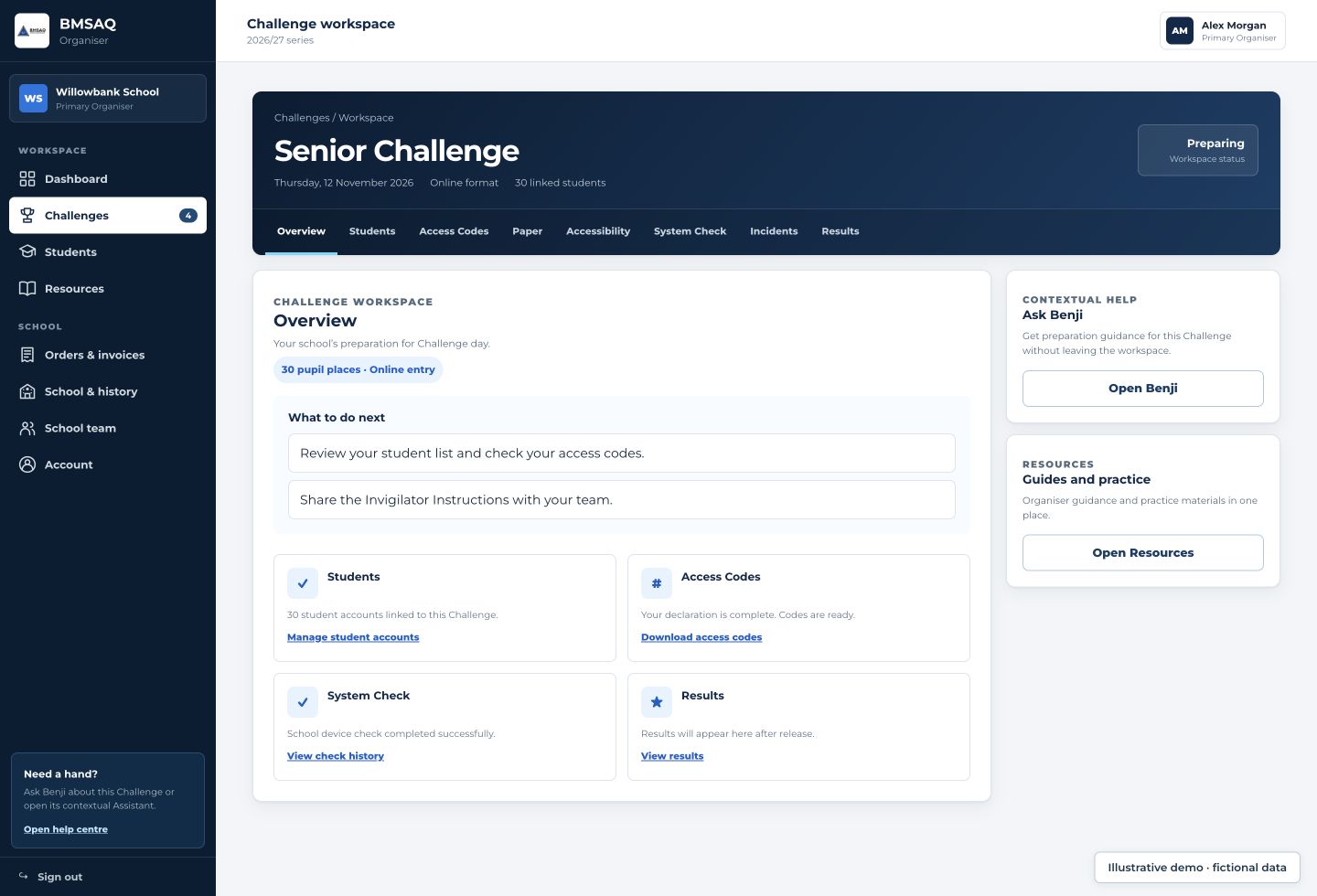
One place to prepare your school.
Review your entries, check access codes and keep preparations together in the Challenge workspace.
 01
01Your entries
Choose eligible pupils, a Challenge and the format.
 02
02Your preparations
Arrange materials, the room and supervision.
 03
03Your school results
Share each pupil's released result privately.
Before
Choose the Challenge, order entries and prepare pupils, materials and the room.
During
Supervise independent work, follow the rules and record interruptions.
After
Complete the return, then share released results and recognition privately.
Before Challenge day
A few decisions make the day simpler.
Confirm who is entering and how the school will run the sitting. The current Challenge workspace provides the operational instructions.
Check the series dates- Choose the level. Check each pupil’s school-year eligibility.
- Order the entries. Choose online or school-printed paper where supported, then the quantity for that Challenge.
- Agree arrangements. Confirm the room, supervising staff and any pupil access requirements early.
- Check readiness. Read the instructions, prepare materials and run the Teacher System Check for online sittings.
Preparing pupils
Familiarity helps.
A revision course is not the point.
Show pupils the question style, explain the procedure and encourage broad curiosity. The Challenge reaches beyond a single subject syllabus.
Explore practice materialPDF + OnlineChoose your level



Preparing the format
Devices ready. Or papers ready.
Online at school
Pupils use the Challenge Portal on a suitable device, with school-issued access details.
- Run the Teacher System Check in advance.
- Check the room’s devices and connection.
- Pupils answer and submit on screen.
Paper at school
Where supported, your school prints the supplied question papers and answer sheets.
- Access materials through the Challenge workspace.
- Keep printed papers secure before the sitting.
- Follow the current answer-sheet return instructions.
Two ways to take the same Challenge. Individual pupils, the same academic standard, teacher supervision throughout.
Paper materials are printed by the school. Keep both printed materials and online credentials secure, and use the current workspace instructions for access and returns.
The teacher’s workspace
One Challenge, the information you need.
Open a Challenge from your Organiser dashboard. Available actions depend on your school’s entries, your role and the current release stage.
- Ordering and preparation
- Orders and invoices record your school’s entry. The Challenge overview keeps preparation in context.
- Students and materials
- Manage the pupil information and authorised materials needed for the entered sitting.
- System Check and incidents
- Check online readiness and record operational problems in the appropriate workspace.
- Results
- See released school results and available documents after marking and review.
During the sitting
Supervise the room.
Let pupils do the thinking.
Explain the procedure and permitted materials before the start. Pupils then answer independently throughout the supervised sitting.
The normal time is 30 minutes. Use authorised access arrangements and the instructions for that pupil’s sitting.
Read the Challenge rulesIf something goes wrong
A clear next step, even on a difficult day.
A device or connection issue
Use the Challenge workspace to record the interruption and follow the authorised recovery process. Do not promise a time adjustment before it is approved.
An emergency
Pupil safety comes first. Follow the school’s emergency procedure, then record the incident when it is safe to do so.
An unclear instruction
Check the active workspace and contact BMSAQ. Share the Challenge and relevant facts, without passwords or access codes.
After the sitting
From completed papers to personal achievement.
Check online completion or follow the paper return instructions. Results become available privately after release; any review or processing issue may affect that timing.
Example result · fictional data
Your Challenge result
Alex Morgan · Senior Challenge
Shared through your school. Recognition and certificates follow the released outcome, where applicable. An optional Student Account can show your own released record. There is no public result list.Share through school
You can provide each pupil’s result directly. Pupils do not need an account to participate or receive their result.
Explain recognition
Use the released awards and documents for that Challenge. Recognition follows the current rules and release decisions.
Support optional accounts
A Student Account can hold a pupil’s own linked, released records. It is separate from live Challenge access.
Questions from organisers
Can I help a pupil with a question?
You can explain procedure, but must not interpret or answer a Challenge question. Pupils complete the academic work independently.
What should pupils bring?
Follow the instructions for the chosen format. The current Rules allow rough paper and specify a B or HB pencil for paper answer sheets; calculators and measuring instruments are not permitted.
When should I arrange pupil support?
Plan early and contact BMSAQ about requirements. Check the current Accessibility information and Challenge instructions for supported arrangements and request timing.
School approval support
Need to share BMSAQ with your school?
Give your Head Teacher, Principal or senior leadership team a concise introduction to the Challenge and its practical arrangements. Registration is free; schools then order individual pupil entries at the current regional price.
The Challenge normally takes place at school, with teacher supervision and online or paper delivery where supported. There is no normal central travel requirement or teacher marking of Challenge answers.
Your school sign-up journey
- Check which Challenge is suitable. Confirm the current age categories and regional arrangements.
- Register your school. Registration is free. Check first whether your school already uses BMSAQ.
- Create or confirm School Organiser access. If your school already uses BMSAQ, ask the existing School Organiser or use the school-access route in the Organiser Portal rather than registering the school again.
- Order pupil entries. Choose the appropriate Challenge and supported format at the current regional price.
- Complete readiness before Challenge Day. Follow the Organiser guidance and arrange supervision, materials and any authorised accessibility support.
Ready for the next step
Bring your school’s plan together.
Open your existing workspace or register your school.